
ChatGPT Quicker: Boost AI Chat Speed
Overview
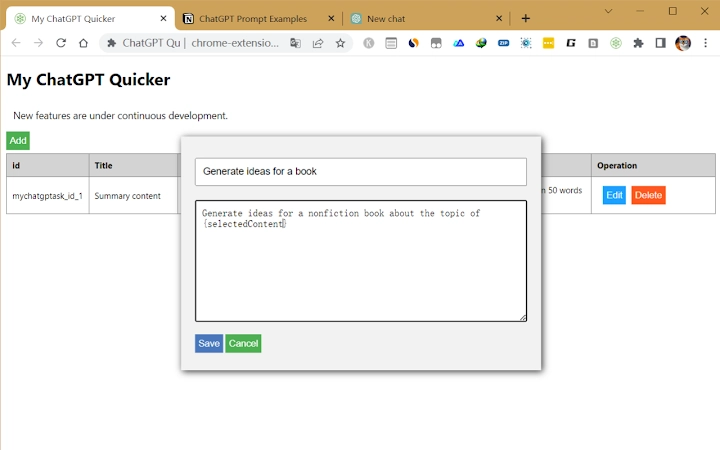
ChatGPT Quicker is a browser extension designed to enhance the efficiency and speed of using ChatGPT within web browsers. The tool targets users who rely on ChatGPT for frequent communication, content creation, or workflow automation. By offering predefined text snippets and keyboard shortcuts, it reduces repetitive typing and streamlines interactions with the AI. This makes it particularly useful for professionals, students, and content creators who engage with ChatGPT multiple times daily.
The extension enables users to quickly generate list items from selected text, improving the structure and clarity of their inputs. This feature supports faster drafting and editing, especially when preparing prompts or organizing ideas. The developer, ChatGPT Quicker Team, has positioned the tool as a productivity booster focused on minimizing friction in daily AI interactions.
While the extension is currently limited to basic automation features, future updates are expected to include module libraries, advanced template editing, and cloud synchronization. These additions may support more complex workflows and collaborative use. The tool is available at no cost, making it accessible to a broad audience seeking to optimize their ChatGPT experience.
Key Features & Capabilities
- Predefined Text Snippets: Users can store and quickly insert commonly used phrases or commands, reducing the need for repetitive typing during conversations with ChatGPT.
- Keyboard Shortcuts: Customizable shortcuts allow rapid execution of actions, improving workflow speed and minimizing mouse dependency.
- Text-to-List Conversion: Selecting any text on a page and using a shortcut instantly converts it into a formatted list, ideal for organizing ideas or structuring prompts.
- Future Template Management: Planned features include advanced template editing, import/export functionality, and cloud storage synchronization for seamless access across devices.
- Modular Design: The extension is built to support future expansions, such as shared template libraries and collaborative content management.
These features are intended to simplify the process of crafting effective prompts, especially in high-volume or time-sensitive scenarios. For example, a writer might use a saved snippet to initiate a blog outline, while a student could convert a paragraph into a bullet-point summary with a single action. The tool’s focus on automation and structure helps maintain consistency and clarity in AI-driven communication.
User Interface, Workflow & Performance
The extension’s user interface is designed to be minimal and non-intrusive, integrating directly into the browser environment without disrupting the ChatGPT interface. Navigation is straightforward, relying on keyboard shortcuts and context menus for activation. Users can access saved snippets through a lightweight popup or via a dedicated shortcut.
Workflow efficiency is enhanced by the ability to act on selected text immediately, reducing the number of steps required to format input. The tool operates in real time, responding to user actions with minimal delay. However, exact performance details such as CPU or RAM usage were not specified by the developer.
Stability appears to be a focus, given the tool’s lightweight nature and single-purpose design. No reported issues with crashes or conflicts were mentioned. The extension is expected to maintain consistent behavior across sessions, though real-world testing data is not available. General software behavior patterns suggest reliable operation under typical usage conditions.
Compatibility & System Requirements
ChatGPT Quicker is compatible with both Windows and Mac operating systems, ensuring broad accessibility for desktop users. It is designed as a browser extension, meaning it runs within supported web browsers such as Chrome, Edge, or Firefox, though specific browser support was not detailed.
The installation size is 1.2 MB, indicating a lightweight footprint that should not significantly impact system performance. The software version is 1.0.0, released on May 10, 2024. The developer did not provide additional system requirements, including minimum RAM, processor, or browser version details.
Platform compatibility information is limited, and users are advised to ensure their browser supports extensions and has JavaScript enabled. The extension may require permissions to access page content and modify data, which is typical for browser tools of this nature.
Pros and Cons
Pros
- Free to use with no cost barriers
- Lightweight installation at just 1.2 MB
- Efficient text-to-list conversion for faster prompt structuring
- Supports keyboard shortcuts for rapid input execution
- Future updates promise advanced template and cloud features
Cons
- Exact system requirements were not listed
- Performance resource usage details were not provided
- Only available as a browser extension, not a standalone desktop app
- Limited to basic automation features in current version
- Compatibility with specific browsers was not confirmed
FAQ Section
Is ChatGPT Quicker available for all browsers?
The extension is designed for use in web browsers, but specific browser compatibility was not detailed by the developer. Users should check their browser’s extension store for availability.
Is the extension safe to use with sensitive data?
As a browser extension, it may access selected page content. Users should exercise caution when using it with confidential or private information.
How often are updates released?
Updates are expected to be released periodically, with new features like template management and cloud sync planned for future versions.
Can I use this tool offline?
The extension functions within the browser environment and may require an internet connection to interact with ChatGPT. Offline functionality was not specified.
What type of license does it have?
The tool is currently offered as free software with no licensing restrictions mentioned. It is intended for personal and professional use.
Final Thoughts + CTA
ChatGPT Quicker delivers a focused, efficient enhancement to the ChatGPT experience, particularly for users who value speed and structured input. Its core features—text snippets, keyboard shortcuts, and instant list conversion—address real pain points in daily AI interaction. While the current version is limited in scope, the roadmap suggests significant future improvements, including cloud synchronization and advanced templates.
For professionals and students who rely on ChatGPT repeatedly, this tool offers a practical way to reduce friction and improve consistency. Its free access and minimal system impact make it a low-risk addition to any workflow.
Download ChatGPT Quicker now







